
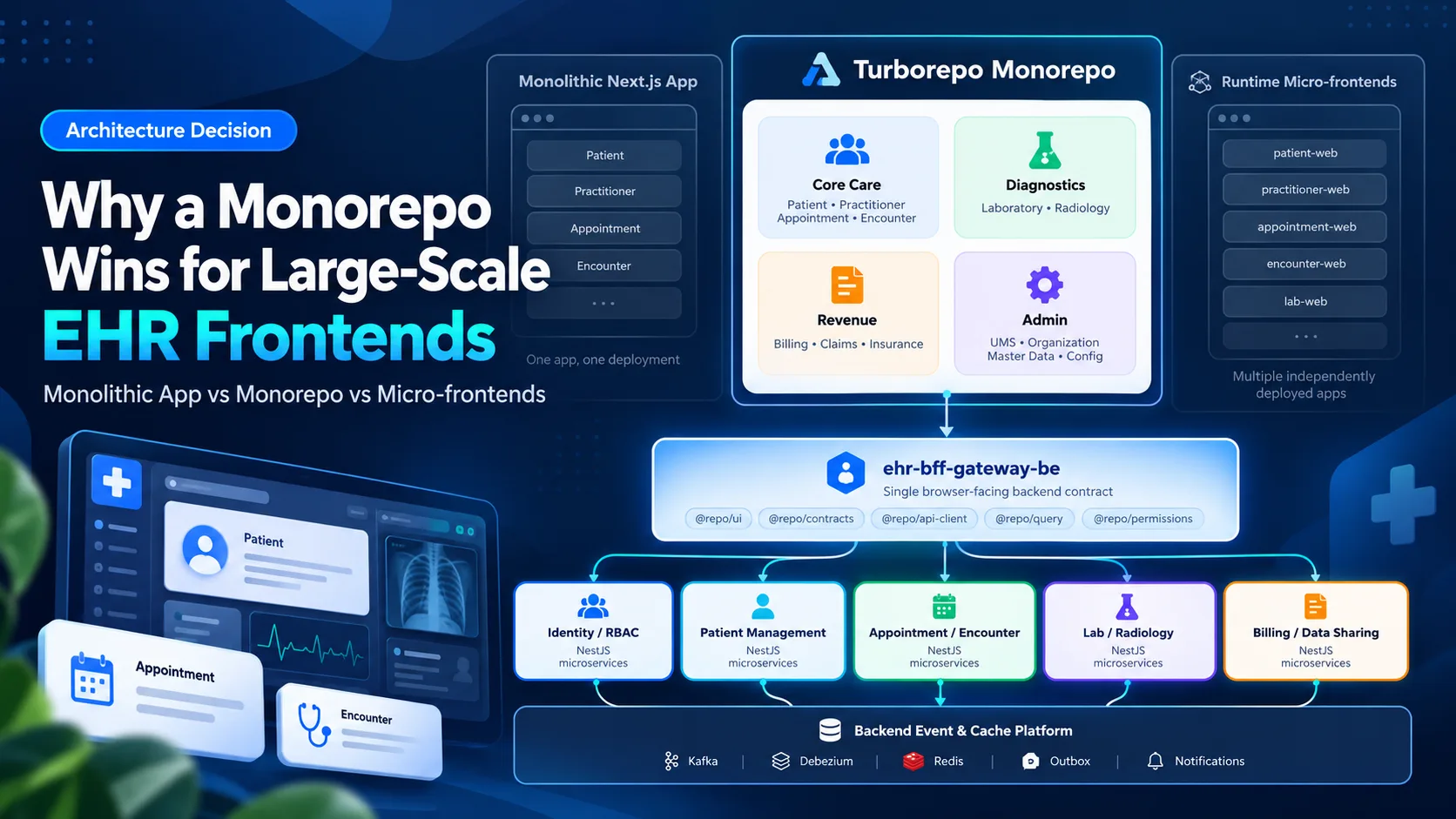
Why a Monorepo Is the Right Frontend Architecture for a Large-Scale EHR
A practical architecture guide for choosing between a monolithic Next.js app, a Turborepo monorepo, and micro-frontends for a large EHR backed by NestJS microservices.
Introduction
A large Electronic Health Record system rarely stays small.
It may begin with OPD workflows such as patient registration, practitioner scheduling, appointments, and encounters. Soon, the same platform needs laboratory, radiology, medication, billing, IPD, nursing, emergency, operating theatre, insurance, claims, administration, and patient self-service.
At that point, the frontend architecture becomes just as important as the backend architecture.
Our backend can remain correctly decomposed into NestJS microservices behind a BFF, but that does not mean the frontend should copy the backend one service at a time.
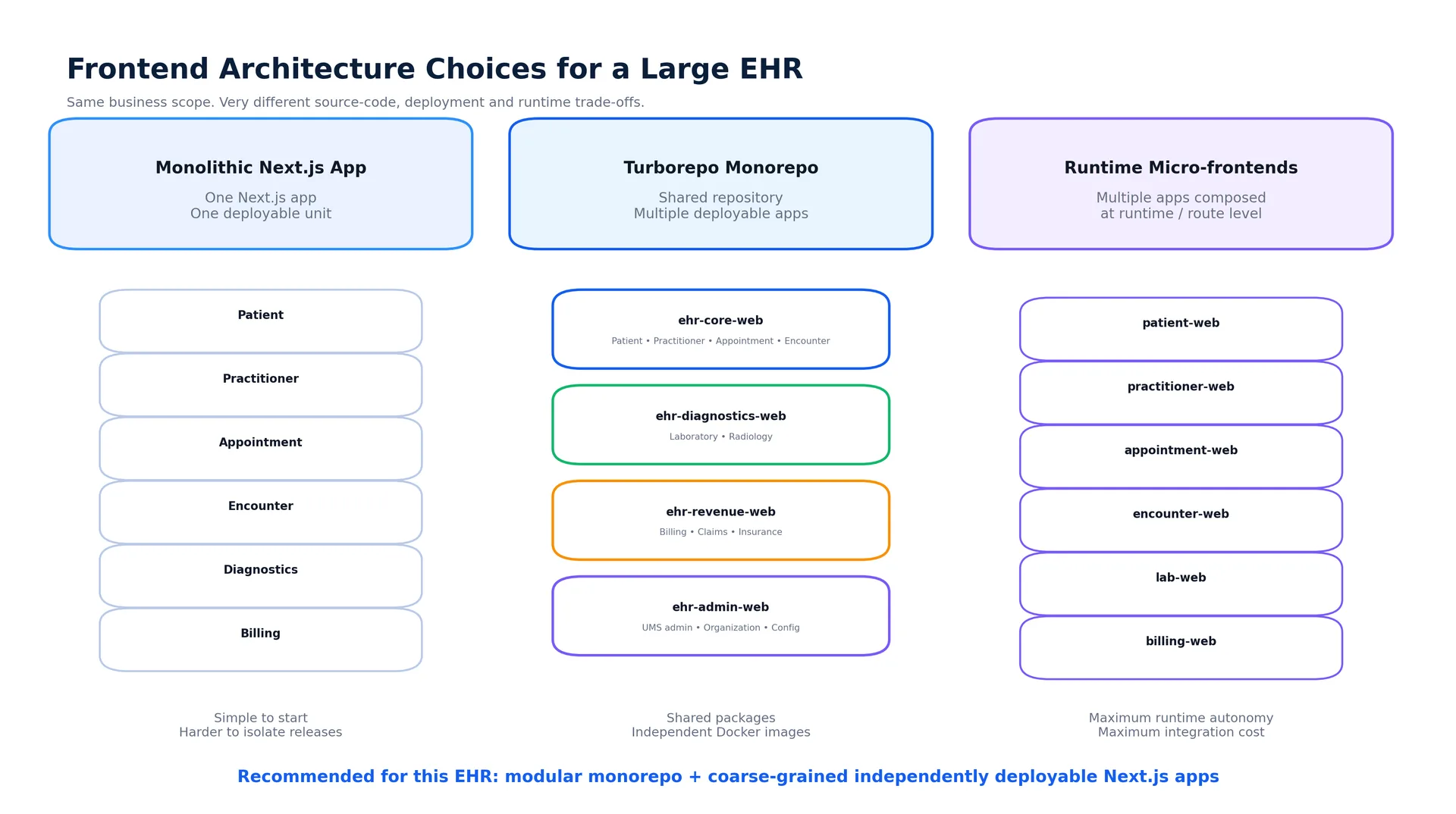
The real frontend decision is between three very different approaches:
one large monolithic Next.js application,
a modular monorepo containing multiple Next.js applications and shared packages,
runtime micro-frontends with many independently composed frontend applications.
For a long-lived EHR, I prefer a Turborepo monorepo with a small number of coarse-grained, independently deployable Next.js applications.
The backend remains microservices.
The frontend remains modular.
And the browser sees one coherent product.
Background
Before comparing the options, it is important to separate concepts that are often mixed together.
A monorepo is primarily a source-code and build organization strategy.
A microservice is a backend runtime and service ownership strategy.
A micro-frontend is a frontend runtime/deployment decomposition strategy.
These are not competing words from the same category.
A system can legitimately use all of the following at the same time:
a Turborepo monorepo for frontend source code,
several independently deployable Next.js applications,
NestJS microservices on the backend,
one BFF for frontend-facing API composition,
Kafka, Debezium, Redis, and domain databases behind the BFF.
That combination is exactly what fits a large EHR well.
The EHR scope we need to support
Consider the core user journey:
Patient
→ Practitioner
→ Appointment
→ Encounter
→ Orders
→ Laboratory / Radiology / Medication
→ Billing
These modules are separate business domains, but they are not isolated user experiences.
A receptionist may search a patient, select a practitioner, book an appointment, and check the patient in.
A physician opens that same patient, starts an encounter, places an order, reviews laboratory or radiology results, and completes the encounter.
Billing may then consume the same encounter context.
The frontend must preserve this continuity without becoming one enormous, unmaintainable application.
Main Section
1. Option One: One Monolithic Next.js Application
The simplest architecture is a single Next.js application:
ehr-web/
├── app/
├── domains/
├── components/
└── package.json
Everything is built and deployed together.
Patient, Practitioner, Appointment, Encounter, Laboratory, Radiology, Billing, UMS, and Administration all live inside the same application.
Why it looks attractive
A monolithic Next.js application gives you several immediate advantages:
one repository,
one development server,
one deployment,
one session model,
one navigation shell,
no cross-application routing,
easy local development,
easy reuse of components.
For an early OPD-only product, this can work very well.
Next.js also automatically splits code by route segments, so a single application is not the same thing as shipping one giant JavaScript bundle to every user.
Where it begins to hurt
The problem appears when the organization and feature set grow.
Imagine the application now contains:
Patient
Practitioner
Appointment
Encounter
Orders
Medication
Laboratory
Radiology
Billing
Claims
Insurance
IPD
Nursing
Emergency
OT
Administration
Patient Portal
Even with good domain folders, the entire product still shares:
one release,
one production image,
one rollback,
one deployment cadence,
one scaling profile,
one application-level failure domain.
If the Radiology team needs to release independently, the whole EHR is rebuilt.
If Diagnostics has a large memory profile but Front Office does not, both still scale as one unit.
If Administration needs a different release cadence or tighter security boundary, it is still coupled to the same deployable.
This is why I would not use a single deployable Next.js application as the long-term boundary for a hospital-wide platform.
2. Option Two: Modular Turborepo Monorepo
A monorepo lets us keep a unified engineering environment while creating multiple deployable frontend applications.
For example:
ehr-frontend/
│
├── apps/
│   ├── ehr-core-web/
│   ├── ehr-diagnostics-web/
│   ├── ehr-revenue-web/
│   ├── ehr-admin-web/
│   └── ehr-patient-portal-web/
│
├── packages/
│   ├── ui/
│   ├── auth/
│   ├── contracts/
│   ├── api-client/
│   ├── query/
│   ├── permissions/
│   ├── observability/
│   ├── eslint-config/
│   └── typescript-config/
│
├── turbo.json
├── pnpm-workspace.yaml
└── package.json
This gives us a very important balance:
shared source-level standards without forcing one runtime deployment.
3. How I Would Group the EHR Applications
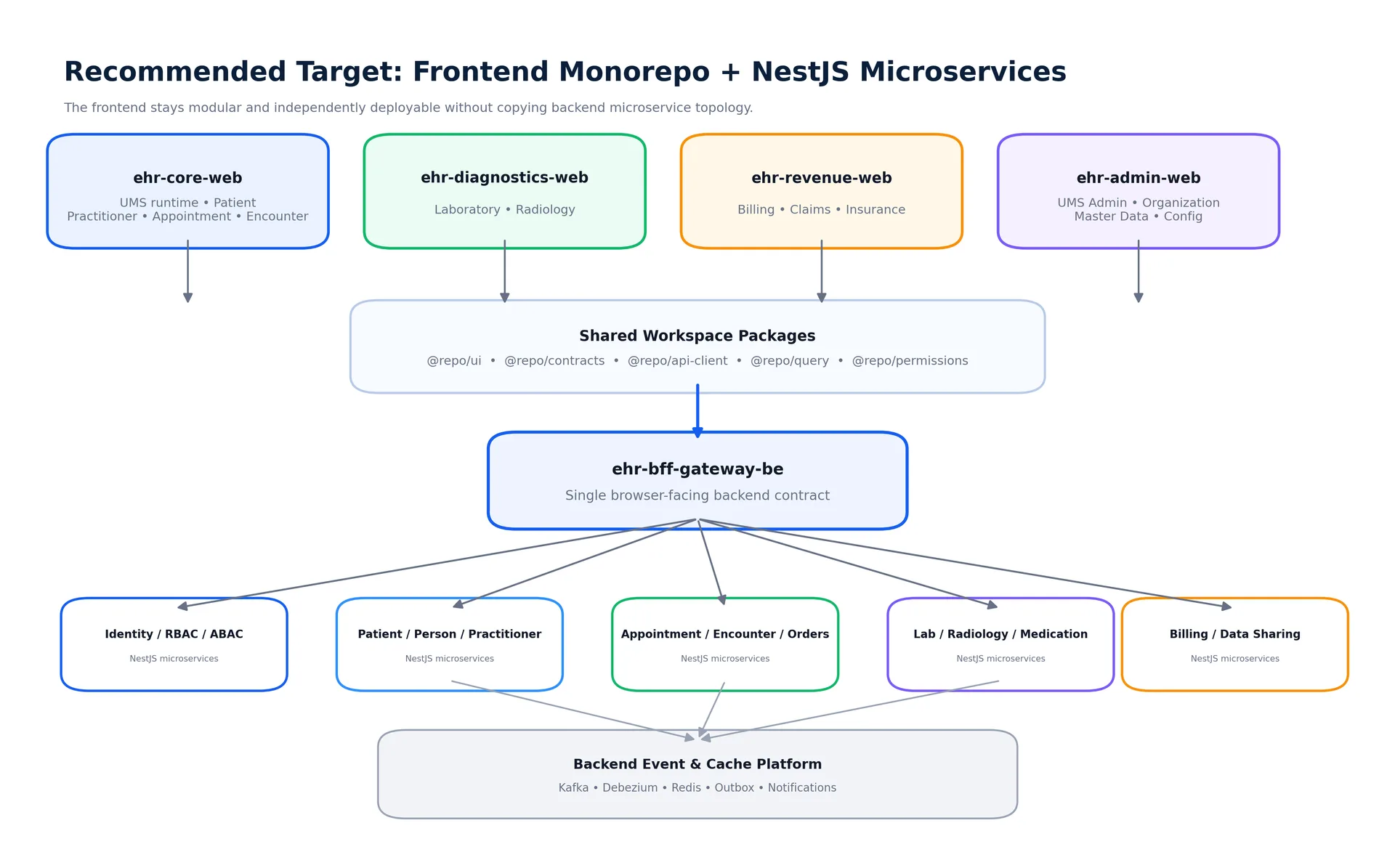
The most important design decision is not to create one frontend app for every backend microservice.
That would produce:
patient-web
practitioner-web
appointment-web
encounter-web
lab-web
radiology-web
billing-web
...
Technically, this looks "microservice aligned."
From a user-experience perspective, it is usually the wrong boundary.
ehr-core-web
Keep the highest-frequency clinical journey together:
UMS runtime
Patient
Practitioner
Appointment
Encounter
Orders
Medication
Referral
Why?
Because these pages are constantly traversed together.
A receptionist moves between Patient and Appointment.
A physician moves between Patient, Encounter, Orders, and Medication.
Splitting them into separate runtime applications creates unnecessary hard navigations, duplicated bootstrapping, and more session/context rehydration.
ehr-diagnostics-web
Good independent boundary:
Laboratory
Radiology
Diagnostics often has:
specialized workflows,
specialized worklists,
different operational teams,
different release frequency,
different performance characteristics.
It can still receive patientId, encounterId, or orderId from Core Care and load the authoritative state from the BFF.
ehr-revenue-web
Another reasonable independent boundary:
Billing
Insurance
Claims
Revenue Cycle
Financial workflows often have separate ownership, scaling, compliance, and deployment requirements.
ehr-admin-web
Administration is naturally isolated:
UMS Administration
Organization
Master Data
System Configuration
Access Administration
It is also a stronger security boundary than normal clinical navigation.
ehr-patient-portal-web
The Patient Portal should almost certainly be separate.
It has a different:
trust boundary,
user population,
UX,
permission scope,
release risk,
internet exposure profile.
4. Why This Is Better Than Runtime Micro-Frontends Everywhere
Micro-frontends maximize deployment independence.
That is useful when teams are truly independent.
But they also introduce another architectural layer.
You now need to solve:
runtime composition,
cross-frontend navigation,
version compatibility,
session synchronization,
shared design systems,
duplicated dependencies,
observability across frontends,
consistent error handling,
routing,
cross-application context transfer.
If Patient, Practitioner, Appointment, and Encounter were four independent runtime micro-frontends, the most common EHR workflow would constantly cross application boundaries.
That is architectural overhead without enough business value.
The better principle is:
Split a frontend application when the team, release cadence, security boundary, navigation frequency, or runtime scaling requirement justifies it.
Do not split it merely because a backend service exists.
5. Frontend Monorepo + Backend Microservices
The backend can remain fully microservice based.
The frontend does not directly call every service.
Instead:
Next.js frontend
→ ehr-bff-gateway-be
→ NestJS microservices
The BFF protects the frontend from internal service topology.
A Patient screen should not know that one page requires:
Person Service,
Patient Service,
Organization Service,
Appointment Service,
Billing Service.
The BFF can expose a frontend-oriented resource such as:
GET /v1/ui/patients/{patientId}/workspace
and internally compose the required services.
This reduces browser request waterfalls and keeps backend orchestration where it belongs.
6. How Independently Deployed Frontends Communicate
One of the biggest concerns with multiple frontend applications is:
How does Diagnostics know which patient I opened in Core Care?
The answer should not be a global cross-application Redux store.
Instead, applications communicate using stable resource identifiers and the backend as the source of truth.
Example:
Core Care
Patient #12345
    ↓
navigate to
/diagnostics/patients/12345/laboratory
    ↓
Diagnostics app starts
    ↓
validates the same authenticated user
    ↓
loads Patient #12345 from BFF
Pass identifiers such as:
patientId
encounterId
appointmentId
orderId
accountId
Do not pass:
complete patient objects
full query caches
Redux state
access tokens
permission objects
This makes each frontend independently recoverable.
If the Diagnostics application is refreshed directly, it can reconstruct its state from the URL and BFF.
7. One UMS, Multiple Frontend Applications
All frontend applications should use the same UMS / identity platform.
The identity system remains centralized.
The applications do not create separate users.
A typical flow is:
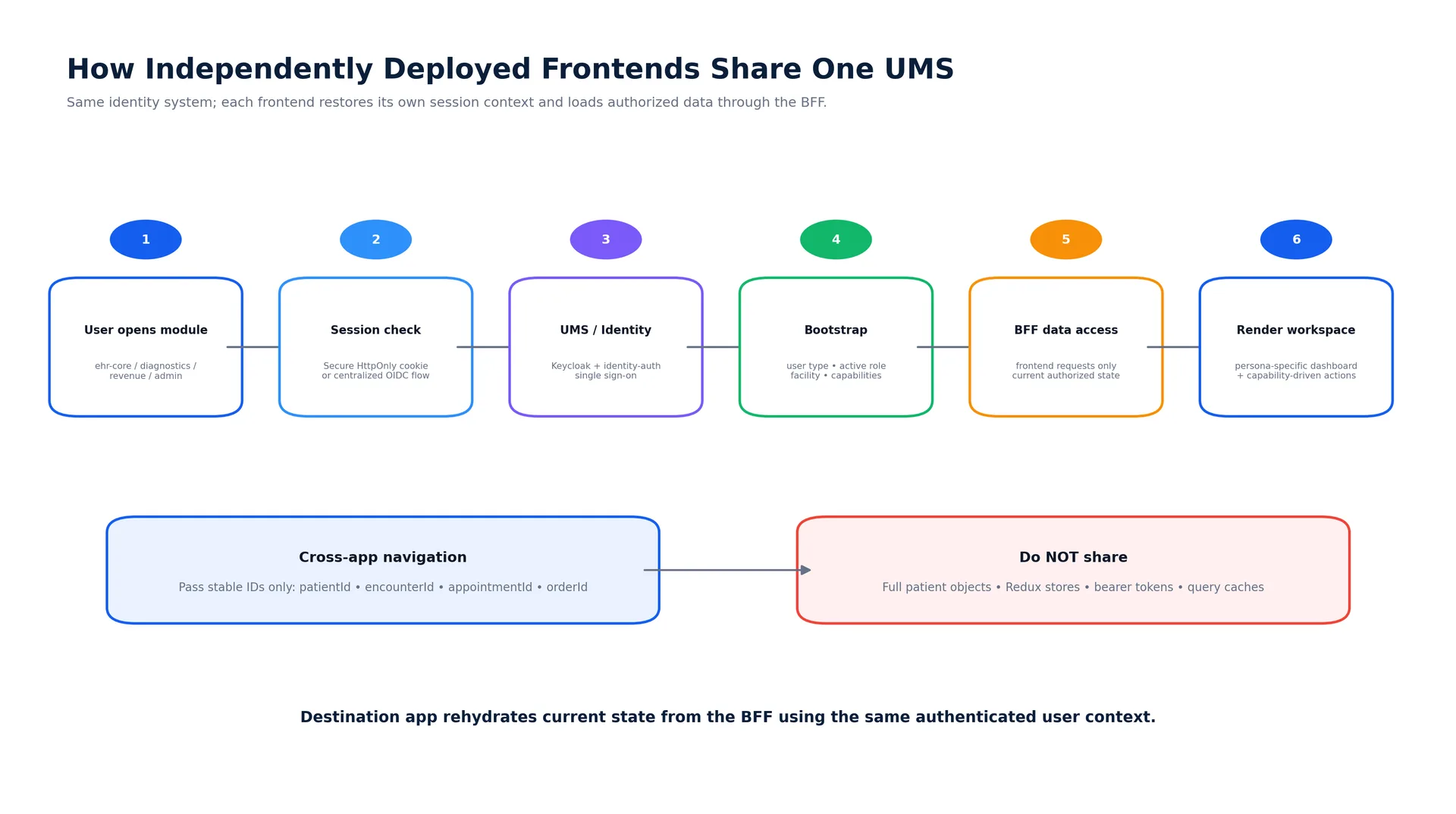
The user signs in once.
Then each application restores a secure session and requests a bootstrap contract containing information such as:
{
  "user": {
    "id": 123,
    "displayName": "User Name"
  },
  "userType": {
    "id": 19,
    "name": "Receptionist"
  },
  "workspace": {
    "facilityId": 14
  },
  "capabilities": [
    "patient.search",
    "appointment.read",
    "appointment.create"
  ]
}
This means:
User Type can select the default persona/dashboard.
RBAC can decide broad actions.
ABAC can enforce resource/facility context.
The backend still makes the final authorization decision.
The frontend does not need to copy the permission engine.
8. Independent Deployment Does Not Require Separate Repositories
This is one of the strongest reasons to prefer a monorepo.
All frontend applications live together, but each application can produce its own Docker image.
For example:
ehr-core-web
→ core:v4.2.1
→ 8 replicas

ehr-diagnostics-web
→ diagnostics:v2.7.0
→ 3 replicas

ehr-revenue-web
→ revenue:v1.9.4
→ 2 replicas

ehr-admin-web
→ admin:v1.4.3
→ 2 replicas
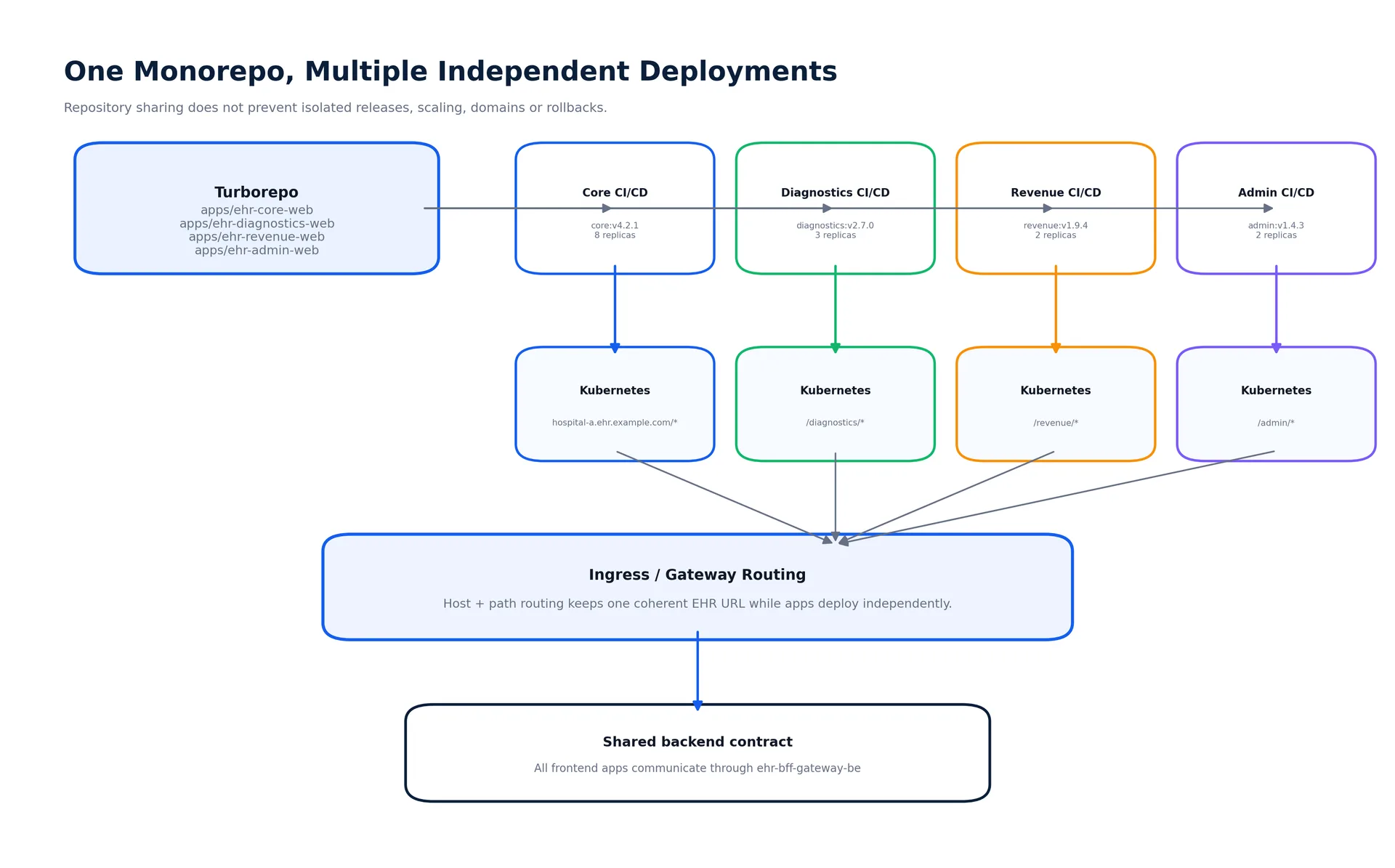
A change only affecting Diagnostics should not require releasing Core Care.
Turborepo can help identify affected packages/tasks and can prune the monorepo for Docker-oriented builds.
Next.js can also produce standalone deployment output so each app can be packaged separately.
That gives us:
shared code,
shared standards,
isolated releases,
isolated scaling,
isolated rollbacks.
9. Containerization Strategy
Each deployable application should have its own image.
Example structure:
apps/
├── ehr-core-web/
│   ├── Dockerfile
│   └── next.config.ts
├── ehr-diagnostics-web/
│   ├── Dockerfile
│   └── next.config.ts
├── ehr-revenue-web/
│   ├── Dockerfile
│   └── next.config.ts
└── ehr-admin-web/
    ├── Dockerfile
    └── next.config.ts
The pipeline can conceptually run:
turbo run build --filter=ehr-diagnostics-web
or create a pruned workspace for that application.
Each application becomes a separate Kubernetes Deployment:
ehr-core-web-deployment
ehr-diagnostics-web-deployment
ehr-revenue-web-deployment
ehr-admin-web-deployment
Each can have its own:
CPU/memory requests,
Horizontal Pod Autoscaler,
replica count,
health checks,
image version,
rollout,
rollback.
10. Domain and Subdomain Routing
I prefer keeping normal staff workflows under one coherent EHR hostname where possible.
For example:
hospital-a.ehr.example.com/
hospital-a.ehr.example.com/patients/*
hospital-a.ehr.example.com/appointments/*
hospital-a.ehr.example.com/encounters/*

hospital-a.ehr.example.com/diagnostics/*
hospital-a.ehr.example.com/revenue/*
hospital-a.ehr.example.com/admin/*
An ingress or gateway routes these paths to different frontend services.
This gives users one coherent product while preserving independent deployments.
Separate subdomains make more sense where the trust boundary is genuinely different:
auth.ehr.example.com
portal.example.com
api.ehr.example.com
For example, the Patient Portal is naturally different from the staff EHR.
11. Folder Structure Inside ehr-core-web
The app itself still needs strong internal boundaries.
I would structure it by business domain:
apps/ehr-core-web/src/
│
├── app/
│   ├── (workspace)/
│   │   ├── patients/
│   │   ├── appointments/
│   │   ├── encounters/
│   │   ├── orders/
│   │   └── medications/
│   └── layout.tsx
│
├── domains/
│   ├── patient/
│   │   ├── components/
│   │   ├── server/
│   │   ├── client/
│   │   ├── schemas/
│   │   └── permissions/
│   ├── practitioner/
│   ├── appointment/
│   ├── encounter/
│   ├── order/
│   ├── medication/
│   └── referral/
│
├── workflows/
│   ├── patient-registration/
│   ├── appointment-booking/
│   └── opd-visit/
│
└── compositions/
    ├── patient-workspace/
    ├── front-office-dashboard/
    └── physician-dashboard/
This avoids the common enterprise frontend problem:
components/
hooks/
services/
utils/
types/
schemas/
where every business domain gets mixed into giant technical folders.
12. Shared Packages
Only truly reusable platform concerns should go into workspace packages.
For example:
packages/
├── ui/
├── auth/
├── contracts/
├── api-client/
├── query/
├── permissions/
├── observability/
├── eslint-config/
└── typescript-config/
Avoid one enormous:
packages/shared/
because it quickly becomes a dumping ground.
13. State Management Across the Architecture
A large frontend does not mean we need a large global Redux store.
Use the tool that matches the state.
StateOwnerPatient, Appointment, EncounterBackendInitial route dataServer ComponentsInteractive remote dataTanStack QueryTable filters and paginationURL/search paramsForm fieldsReact Hook FormRuntime validationZodSimple component stateReact stateComplex finite UI workflowXState when justifiedTruly global browser-only stateRedux Toolkit
This becomes even more important when applications deploy separately.
Never design the architecture around sharing one global browser store across applications.
14. Performance Benefits of This Model
This architecture helps performance in several ways.
Server-first rendering
Use React Server Components for initial and read-heavy screens.
Examples:
Patient header,
Encounter summary,
Dashboard sections,
Billing summary.
Only hydrate interactive parts such as:
Appointment scheduler,
Search combobox,
Data table,
Clinical form,
Realtime subscriber.
Smaller client bundles
Core Care does not need to ship Radiology-specific code.
Revenue does not need to ship clinical-order UI.
Admin does not need Appointment scheduling code.
Independent scaling
If Diagnostics worklists become heavily used, scale:
ehr-diagnostics-web
without scaling the entire EHR frontend.
Independent releases
A Billing release does not force an Appointment release.
That reduces blast radius.
15. Why Not Create a Frontend Microservice for Every Backend Service?
Because frontend boundaries should follow user journeys, not just backend ownership.
Backend:
patient-svc
practitioner-svc
appointment-svc
encounter-svc
Frontend user journey:
Patient
→ Appointment
→ Encounter
→ Patient
Those are tightly connected screens.
Breaking each into a separate frontend runtime makes the most common journey slower and more operationally complicated.
The architecture should therefore be coarse-grained.
16. When Should We Extract Another Frontend App?
A domain becomes a good candidate when several of these become true:
It has a clearly independent product/team owner.
It needs independent releases frequently.
It has a different scaling profile.
Users do not constantly navigate between it and Core Care.
It has a stronger trust/security boundary.
Its dependencies can be expressed through stable URLs and BFF contracts.
Operational independence creates more value than navigation overhead.
This is why Diagnostics, Revenue, Admin, and Patient Portal are stronger candidates than Patient or Appointment.
Key Takeaways
Monorepo and microservices solve different problems. Use a frontend monorepo and keep the NestJS backend as microservices.
Do not create one frontend per backend microservice. Frontend boundaries should follow user journeys and operational boundaries.
Keep Patient, Practitioner, Appointment, and Encounter together in a Core Care application because they are traversed constantly.
Use multiple Next.js apps inside one Turborepo when Diagnostics, Revenue, Admin, or Patient Portal need isolated deployments.
One repository does not mean one deployment. Each app can create its own Docker image, Kubernetes Deployment, HPA, version, and rollback.
Use one UMS/SSO system across all frontend apps. Each application restores its own authorized session context.
Communicate across apps with stable resource IDs and the BFF, not with shared Redux state or full patient objects.
Keep the BFF as the frontend-facing contract and hide internal NestJS microservice topology from the browser.
Use Server Components by default and keep Client Components as small interactive islands.
Extract new frontend applications only when the organizational/runtime benefit is larger than the integration cost.
Conclusion
For a small product, one Next.js application is perfectly reasonable.
For a hospital-wide EHR expected to grow from OPD into IPD, Diagnostics, Revenue Cycle, Administration, Emergency, Nursing, OT, and Patient Self-Service, I would not let that single deployable grow forever.
At the same time, I would not jump to dozens of frontend microservices.
The better architecture is between those extremes:
A modular Turborepo monorepo containing a small number of independently deployable Next.js applications, all using the same UMS, shared platform packages, and the existing NestJS BFF as their backend contract.
That gives the engineering team one coherent frontend platform without giving up deployment independence.
It keeps the architecture understandable today while leaving enough room to scale tomorrow.
Further reading
Next.js App Router: https://nextjs.org/docs/app
Next.js Multi-Zones: https://nextjs.org/docs/app/guides/multi-zones
Turborepo documentation: https://turborepo.com/docs
Turborepo Docker guide: https://turborepo.com/docs/guides/tools/docker